
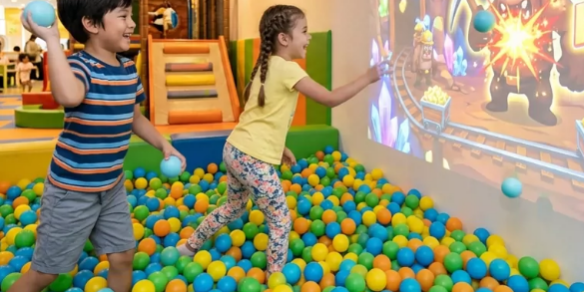
The entertainment industry is moving beyond traditional playground equipment toward more engaging, technology-driven experiences. From children’s indoor playgrounds to digital sports centers and immersive exhibition spaces, interactive ball walls are evolving into dynamic sports gaming environments.
Unlike conventional ball-throwing attractions, modern immersive sports games combine physical activity with real-time scoring, multiplayer challenges, animated graphics, and interactive projection technology.
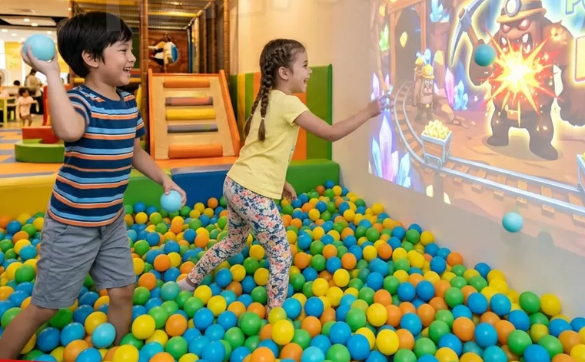
Players can throw soft balls at projected targets, compete in team challenges, or participate in digitally enhanced sports activities. Every successful hit can trigger visual effects, sound feedback, and changes in the game.
However, creating a responsive interactive sports wall requires more than a projector and gaming software.
The interactive LiDAR sensor is a critical component of the system. It detects player interactions, converts physical contact into digital coordinates, and allows the game engine to respond.
For integrators and venue operators, selecting the right sensor and installation configuration directly affects detection accuracy, system responsiveness, maintenance requirements, and project costs.
In this guide, CPJROBOT explains how to design immersive sports games using the F1 PoE LiDAR interactive sensor, including sensor quantity selection, site requirements, hardware configuration, installation, and troubleshooting.
1. Why Traditional Ball Throwing Walls Are Evolving into Immersive Sports Games
Traditional ball walls are common in indoor playgrounds and family entertainment centers. Children throw soft balls at a physical wall or simple projected targets.
While these attractions encourage physical activity, conventional installations often offer limited game variety and repetitive interactions.
Interactive projection technology introduces new possibilities.
Real-Time Scoring and Competitive Gameplay
By integrating LiDAR sensing with interactive game software, ball-throwing activities can become structured digital sports challenges.
For example, operators can create:
- Target Shooting Games: Players throw balls at moving digital targets to earn points.
- Team Competition Games: Multiple players compete to achieve the highest score.
- Reaction Training Games: Players must hit changing targets within a limited time.
- Interactive Sports Challenges: Different difficulty levels encourage repeated participation.
- Educational Sports Games: Children combine physical movement with counting, recognition, or problem-solving activities.
These game formats can make a single interactive wall suitable for different age groups and activity programs.
More Flexible Content for Venue Operators
Traditional playground equipment often requires physical modifications when operators want to introduce new attractions.
Interactive projection systems offer greater flexibility because game themes and visual content can be updated through software.
Depending on the existing infrastructure, operators may be able to upgrade an existing ball wall by adding projection equipment, LiDAR sensing, and compatible interactive game content.
This approach can reduce the need for extensive structural reconstruction.
Multiplayer Interaction
Interactive sports walls are particularly attractive to family entertainment centers because multiple players can interact within the same projected environment.
However, supporting multiple simultaneous interactions requires a sensing system capable of processing activity across the entire playing area.
This is where the CPJROBOT F1 PoE LiDAR becomes an important part of the installation.
2. Why Choose CPJROBOT F1 PoE LiDAR for Interactive Sports Walls?
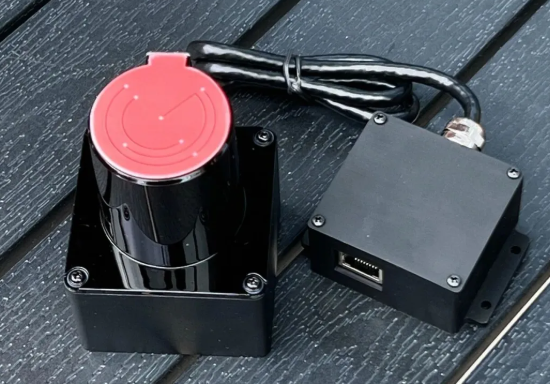
The CPJROBOT F1 is a 2D Time-of-Flight (ToF) LiDAR sensor designed for interactive projection applications.
Instead of relying on a conventional camera to recognize visual targets, the sensor uses laser ranging to detect objects entering its configured scanning plane.
When properly installed and calibrated, the LiDAR system can convert detected interactions into coordinates that interactive software uses to trigger game events.
Key Features of the CPJROBOT F1
| Technical Feature | F1 PoE LiDAR Specification |
|---|---|
| Sensing Technology | 2D Time-of-Flight LiDAR |
| Scanning Angle | 270° |
| Scanning Frequency | Up to 30 FPS |
| Wall Interaction Range | Over 11 m under suitable installation conditions |
| Floor Interaction Range | Over 13 m under suitable installation conditions |
| Power and Data | PoE Ethernet connection |
| Recommended PoE Standard | IEEE 802.3af |
| Network Cable Distance | Up to 100 m for a standard Ethernet connection |
| Environmental Protection | IP65 (verify the specific version) |
| Operating Temperature | -20°C to +60°C |
| Software Support | CPJROBOT LiDAR Touch |
| Integration Options | TUIO, Windows multi-touch, and SDK-based integration |
| Multi-Sensor Installation | Supported for large and irregular interaction areas |
Note: The stated detection ranges and positioning performance are based on CPJROBOT installation guidance. Actual usable coverage depends on mounting geometry, surface conditions, target characteristics, and calibration.
270° Wide-Angle Scanning
The F1 offers a 270° scanning field of view, allowing the sensor to monitor a large interaction area from a suitable mounting position.
This is particularly useful for:
- Wide interactive sports walls
- Digital ball-throwing attractions
- Immersive projection floors
- Children’s playground projection games
- Interactive exhibition walls
A wider scanning angle can reduce the number of sensors required for standard installations.
Up to 30 FPS for Responsive Interaction
Fast-moving sports games require frequent detection updates.
The F1 operates at scanning rates of up to 30 frames per second, providing regular position measurements to the interactive system.
However, sensor scan rate is only one part of the responsiveness equation.
Actual gameplay latency also depends on game software, coordinate processing, rendering performance, projector input delay, and the accuracy of interaction detection.
For competitive ball-throwing games, all components should be tested together.
PoE Single-Cable Installation
The F1 uses Power over Ethernet technology to transmit power and data through a single Ethernet cable.
Compared with sensing equipment that requires separate power and communication wiring, PoE offers practical installation advantages:
- Fewer cables around the playing area
- Easier placement near wall corners or ceiling structures
- Simplified equipment maintenance
- Centralized power distribution
- Flexible integration with networked control systems
These advantages are particularly relevant when retrofitting existing playgrounds or installing sensors across large digital sports venues.
3. How Many F1 LiDAR Sensors Does Your Interactive Sports Venue Need?
One of the most important questions during project planning is:
How many LiDAR sensors are required for an interactive ball wall?
The answer depends on the dimensions, geometry, obstructions, and intended gameplay of the installation.
CPJROBOT F1 provides a practical wall interaction range exceeding 11 meters and a floor interaction range exceeding 13 meters under suitable conditions.
However, these values should not be interpreted as guaranteed coverage for every wall or room layout.
Option A: Single F1 LiDAR for Standard Interactive Walls
A single F1 can be a practical starting point for relatively simple interactive projection areas.
Typical project examples include:
- 3 m × 6 m interactive ball walls
- 4 m × 10 m interactive projection walls
- Standard indoor playground sports walls
- Compact interactive floor game installations
Recommended installation approach:
Mount the sensor near a suitable wall corner or the lower central section of the interactive area, depending on the orientation of the sensing plane.
The objective is to maintain an unobstructed view of the complete interaction zone, including the farthest required detection point.
Before finalizing the installation, verify coverage using CPJROBOT calibration software.
Important: A single-sensor solution should be confirmed through actual coverage testing, particularly for wide walls with challenging corner geometry.
Option B: Multiple F1 LiDAR Sensors for Large Immersive Sports Spaces
For larger or irregular interactive environments, multiple sensors may be necessary.
Examples include:
- Interactive walls longer than 15 meters
- Large digital sports arenas
- L-shaped projection walls
- Three-sided immersive projection rooms
- Curved or panoramic interactive screens
- Floor interaction areas exceeding 100 m²
In these installations, multiple F1 sensors can monitor different zones.
Using CPJROBOT’s multi-LiDAR integration solution, interaction data from different sensors can be mapped into a shared coordinate system.
This helps create a continuous interactive experience across a larger space.
Multi-sensor deployment advantages:
- Improved coverage of large playing areas.
- Reduced blind spots caused by challenging geometry.
- Better flexibility for non-rectangular installations.
- More scalable interactive projection infrastructure.
- Support for large multi-user digital experiences.
Sensor count should be determined through site measurements, coverage modeling, and practical tests rather than floor area alone.
Single vs. Multi-LiDAR Selection
| Project Requirement | Single F1 | Multiple F1 Sensors |
|---|---|---|
| Standard rectangular ball wall | Recommended starting point | Usually unnecessary |
| Extra-long interactive wall | Requires coverage assessment | Often preferable |
| L-shaped projection area | Limited by line of sight | Recommended |
| Three-sided immersive room | May have blind spots | Recommended |
| Large sports interaction floor | Depends on geometry | Often preferable |
| Complex multiplayer installation | Suitable where coverage allows | Useful for extended coverage |
| Installation complexity | Lower | Higher |
| System expansion potential | Limited to sensor coverage | More flexible |
CPJROBOT Recommendation: Start by measuring the longest required sensing distance and checking the full 270° field of view. Add sensors only where coverage, occlusion, or system design requires them.
4. Site Selection: Four Critical Requirements for Stable Interactive LiDAR Performance
Selecting an appropriate installation location is just as important as selecting the sensor itself.
Sports walls experience repeated ball impacts, frequent player movement, and potentially challenging lighting and surface conditions.
The following four requirements should be evaluated before installation.
4.1 Measure the Interaction Area and Plan Sensor Positions
Begin by recording the physical dimensions of the installation.
Important measurements include:
- Wall width and height
- Floor interaction area
- Distance between sensor and the farthest target
- Mounting position and available clearance
- Obstacles near the interaction surface
- Projector position and image boundaries
For a rectangular interactive wall, identify the farthest point from the proposed LiDAR mounting location.
The objective is to maintain reliable sensing across the entire gameplay area.
Because the F1 uses PoE, the sensor can be installed in a suitable position without requiring a separate local power socket, provided compliant networking and cabling are available.
4.2 Avoid Strong Reflections and Environmental Interference
Reflective objects and unsuitable lighting conditions can introduce unwanted signals or reduce detection consistency.
Potential interference sources include:
- Direct sunlight entering the sensing area
- Glass walls and reflective panels
- Highly polished metal surfaces
- Reflective skirting boards
- Moving decorative objects
- Dust or contamination on the sensor window
Although LiDAR does not depend on visible image contrast in the same way as a camera, direct sunlight and reflective materials can still affect ranging performance.
For indoor sports venues, prioritize controlled lighting and a consistent sensing environment.
Keep the sensor window clean and inspect the surrounding area whenever new decorations or equipment are installed.
4.3 Use a Stable Mounting Surface and Maintain Clear Visibility
Interactive ball walls are subject to repeated physical impacts.
If the LiDAR sensor is installed on a structure that vibrates or shifts during gameplay, its calibrated coordinate relationship may change.
This can lead to inaccurate game triggering.
Suitable mounting options may include:
- Solid structural walls
- Rigid steel brackets
- Stable ceiling-mounted frames
- Dedicated sensor support structures
Avoid flexible mounting surfaces or structures directly exposed to repeated ball impacts.
Critical installation rule: The F1’s scanning head must remain unobstructed, with the laser scanning plane correctly positioned relative to the interactive surface.
The sensing plane should be configured to detect intended ball impacts while minimizing irrelevant movement in front of the wall.
For ball-throwing applications, the sensor offset and detection threshold require special attention because balls may approach or rebound from the surface at high speed.
4.4 Check Operating Temperature and Environmental Protection
The CPJROBOT F1 is specified for operation from -20°C to +60°C.
This operating range allows installation in a variety of indoor environments, including some unheated venues and projection rooms with elevated ambient temperatures.
For dusty indoor playgrounds, an appropriately rated sensor enclosure also helps protect the equipment against environmental contamination.
Nevertheless, temperature ratings and ingress protection do not eliminate the need for maintenance.
Avoid installing the sensor close to excessive heat sources, accumulated water, or areas where debris regularly strikes the sensing window.
For outdoor or wet-environment projects, confirm the ingress protection rating of the exact F1 version being supplied.
5. Recommended Hardware Configuration for Immersive Ball Throwing Games
An interactive sports wall is a complete audiovisual and sensing system.
To achieve reliable gameplay, each hardware component must be selected according to the venue’s requirements.
| Hardware Component | Recommended Configuration | Main Function |
|---|---|---|
| Interactive Sensor | CPJROBOT F1 PoE LiDAR | Detect ball and player interactions |
| Projector | Short-throw, ultra-short-throw, or installation laser projector | Display game graphics |
| Projection Brightness | 4,000+ lumens as a preliminary design reference | Maintain image visibility under controlled ambient lighting |
| Impact-Resistant Wall | Suitable reinforced wall or impact-rated projection surface | Withstand repeated soft-ball impacts |
| Interactive Software | CPJROBOT LiDAR Touch and compatible game software | Coordinate mapping and interaction output |
| Control Computer | PC matched to game engine and rendering requirements | Process inputs and render graphics |
| Network Equipment | IEEE 802.3af-compatible PoE switch | Deliver sensor power and Ethernet communication |
| Audio System | Speakers with appropriate game audio output | Provide feedback and immersive sound |
Projector brightness, computer specifications, and wall construction must be validated for the intended installation.
Selecting the Right Projector
For interactive ball-throwing games, projector placement is especially important.
If a standard long-throw projector is placed behind players, their bodies may cast large shadows onto the wall.
Short-throw or ultra-short-throw projectors can help reduce these obstructions.
However, an ultra-short-throw projector is not automatically the best choice for every installation.
Projectors should be evaluated based on throw ratio, required image dimensions, brightness, image distortion, ambient lighting, and protection against ball impacts.
Choosing a Safe, Impact-Resistant Wall
An interactive sports wall should be designed for repeated impacts from the intended soft balls.
Suitable surface solutions may include reinforced projection structures, padded panels, or impact-rated projection materials.
The structure must also account for ball rebound, fasteners, player access, and equipment protection.
The LiDAR sensor and projector should be positioned outside direct impact paths whenever possible.
Software and Game Engine Integration
CPJROBOT provides LiDAR Touch software and SDK resources for integrating sensor interaction data with digital content.
Depending on the application, developers can connect LiDAR interaction output with platforms such as Unity, TouchDesigner, or custom interactive software through supported interfaces.
For sports games, the application software typically manages:
- Target positions and animations
- Scoring logic
- Player identification or team assignment
- Game timers
- Sound and visual feedback
- Difficulty levels
- Session management
The LiDAR sensor supplies detection information, while the game engine determines how each interaction affects gameplay.
6. Step-by-Step Installation Guide for CPJROBOT F1 Interactive Sports Walls
A structured installation process helps reduce calibration errors and avoid unnecessary project rework.
Step 1: Prepare the Projection Surface
Install the projector and adjust the image to fit the selected interaction area.
Correct major geometric distortion, image alignment, and aspect ratio before calibrating the sensor.
For irregular surfaces, use suitable projector mapping or geometric correction tools.
Step 2: Mount the F1 LiDAR Sensor
Position the sensor in the previously selected mounting location.
Connect the sensor to a compatible PoE network switch using suitable Ethernet cabling.
Ensure that the scanning plane has clear visibility of the intended interaction area.
Use a rigid mounting bracket, but allow sufficient adjustment during initial setup.
Step 3: Configure the Network and Calibration Software
Connect the LiDAR and control computer to the network.
Install the CPJROBOT software and confirm that the sensor is communicating correctly.
Check the live sensing data before beginning coordinate calibration.
For multi-sensor systems, configure the required network and zone assignments.
Step 4: Calibrate the Interaction Area
Use LiDAR Touch to define the interactive region.
Perform the supported four-point calibration procedure to map sensor coordinates to the projected image.
Test several positions across the wall, especially:
- The four corners
- The center
- The farthest sensor detection point
- Areas close to the sensor
- Boundaries between adjacent sensors
For demanding sports applications, additional validation points can help identify local alignment errors even when the calibration workflow itself uses four points.
Step 5: Test Ball Impact Detection
Before the venue opens, test the actual balls that will be used during gameplay.
Perform tests at different throwing speeds and angles.
Check whether the system correctly distinguishes intended wall contacts from balls passing through the sensing plane.
Observe both missed impacts and unintended triggers.
Where configurable, adjust detection distance, trigger region, and filtering parameters according to the software documentation.
Step 6: Validate Multi-Player Performance
Invite several participants to test the game simultaneously.
Pay particular attention to:
- Fast consecutive ball impacts
- Multiple balls approaching the same target
- Players standing close to the wall
- Ball rebounds
- Occlusion between players and targets
- Interaction accuracy near screen boundaries
These tests reveal real-world limitations that may not appear during single-user calibration.
7. Troubleshooting Common Interactive Sports Wall Problems
Even a well-designed interactive wall may require adjustments after installation.
The following are common issues in high-activity ball-throwing environments.
Problem 1: LiDAR Coordinates Drift or Touch Positions Become Inaccurate
Possible causes:
- Loose mounting screws
- Structural vibration
- Movement of the sensor bracket
- Changes to the interactive wall surface
- Incorrect calibration
Recommended solutions:
- Inspect mounting screws and bracket stability.
- Check whether the physical sensing plane has shifted.
- Remove new obstructions or reflective objects.
- Reopen LiDAR Touch and repeat coordinate calibration.
- Verify position accuracy across the entire interaction area.
If the wall experiences repeated impacts, inspect the mounting assembly periodically.
Problem 2: Projected Graphics Do Not Match the Touch Area
Possible causes:
The projector may have moved or its geometry settings may have changed.
This creates a mismatch between the projected coordinates and the LiDAR sensing area.
Recommended solutions:
- Confirm the physical projector position.
- Correct image geometry using the projector’s alignment controls or mapping software.
- Restore the intended screen dimensions.
- Recalibrate the LiDAR interaction region.
- Test target detection at the corners and center.
Projector alignment should generally be completed before LiDAR coordinate calibration.
Problem 3: Delayed or Missed Ball Detection During Fast Gameplay
Possible causes:
- High-speed ball movement
- Improper sensing-plane offset
- Multiple objects overlapping within the scan
- Excessive filtering or unsuitable trigger thresholds
- Slow game software processing
- Projector or rendering latency
Recommended solutions:
First, examine the sensor data. Determine whether the ball impact is detected in the raw LiDAR signal.
If the event is missing, review sensor orientation, scanning frequency, and interaction geometry.
Second, review detection settings. Adjust supported distance thresholds or noise-filtering settings to balance unwanted triggers against missed impacts.
Increasing filtering strength may reduce false positives, but excessive filtering can also suppress legitimate fast interactions.
Third, evaluate the computer and game software. Monitor CPU/GPU load, game frame rate, and event-processing performance.
Finally, test complete system latency. Measure the delay between a physical ball impact and the visible game response.
An important engineering consideration is that a 30 FPS sensor updates approximately every 33 milliseconds. Very brief interactions or unfavorable object geometry may therefore require application-specific validation.
No sensor specification alone can guarantee that every high-speed ball impact will be detected.
Problem 4: False Triggers or Ghost Touches
Possible causes:
- Reflective decorative materials
- Contaminated sensor window
- Incorrect detection threshold
- Moving objects near the sensing plane
- Ball rebounds or incidental player movement
Recommended solutions:
Clean the sensor, inspect the raw signal, and identify the location of false triggers.
Exclude irrelevant areas from the calibrated detection region where supported.
Adjust the sensor mounting position if the environment repeatedly generates unwanted signals.
8. Where Can Immersive Ball Wall Games Be Installed?
The flexibility of interactive projection makes LiDAR-based sports games suitable for different commercial and educational environments.
Children’s Indoor Playgrounds
Existing soft-play facilities can introduce interactive ball walls without replacing all their original equipment.
This makes digital sports games an option for operators planning targeted playground upgrades.
Digital Sports Entertainment Centers
Sports-themed venues can combine projection, game scoring, and interactive challenges to create digitally enhanced physical activities.
Applications may include reflex games, target competitions, and team-based challenges.
Family Entertainment Centers
Shopping malls and entertainment facilities can incorporate interactive sports walls into family activity zones.
Digital content updates allow operators to rotate seasonal themes or introduce new challenges.
Schools and Educational Centers
Interactive projection can support movement-based educational activities that encourage coordination, recognition, and group participation.
Applications should be adapted to the age and abilities of the participants.
Museums and Immersive Exhibition Spaces
Interactive ball-throwing experiences can be designed around scientific, environmental, or educational themes.
Visitors can interact with projected objects through physical activity rather than conventional touchscreens.
9. Why Work with CPJROBOT for Interactive Sports Projects?
CPJROBOT develops PoE LiDAR sensing solutions for interactive projection applications.
Its F1 sensor combines wide-angle laser scanning, Ethernet connectivity, and software integration capabilities to support projects ranging from individual interactive walls to larger multi-sensor environments.
Simplified System Installation
PoE connectivity combines power and data transmission, helping reduce wiring complexity in interactive venues.
Support for Different Interaction Surfaces
The F1 can be deployed for wall and floor interaction projects, subject to appropriate installation geometry and calibration.
Multi-LiDAR Expansion
For projects requiring larger sensing areas, CPJROBOT offers multi-sensor integration options that allow systems to expand beyond the coverage of a single device.
Free Calibration Software and Development Resources
CPJROBOT provides LiDAR Touch software and downloadable SDK resources for supported products.
These resources help integrators test sensing performance and develop customized interactive applications.
Technical Support for Project Planning
Project teams can discuss sensor placement, calibration, and system integration requirements with CPJROBOT before finalizing the installation.
For complex immersive sports environments, early technical planning can help avoid unnecessary hardware costs and on-site modifications.
10. Frequently Asked Questions (FAQ)
Q1. Can one F1 PoE LiDAR cover an entire interactive ball wall?
Yes, a single F1 may be suitable for a standard interactive wall if its scanning angle, effective range, and mounting position cover the entire target area. For irregular or extra-wide walls, multiple sensors may be required.
Q2. How many F1 sensors are needed for a 100 m² digital sports area?
There is no universal sensor quantity based solely on floor area. The number depends on geometry, sensor positioning, obstacles, and the type of interaction. A coverage assessment is recommended before selecting the final configuration.
Q3. Can CPJROBOT F1 detect multiple balls hitting a wall?
The F1 supports multi-point sensing. However, reliably distinguishing simultaneous ball impacts depends on ball size, spacing, scan timing, occlusion, and the interaction software. Multi-ball detection should be validated using the actual game equipment.
Q4. Is CPJROBOT F1 compatible with Unity or TouchDesigner?
CPJROBOT provides supported interaction protocols and SDK resources that can be used to integrate LiDAR sensing data with compatible software environments, including Unity and TouchDesigner-based workflows.
Q5. Does PoE LiDAR require a separate power supply?
The F1 can receive power and communicate through its Ethernet connection when used with compatible PoE equipment. A separate power cable at the sensor location is generally unnecessary.
Q6. Can F1 PoE LiDAR be installed in outdoor sports environments?
Outdoor deployment requires evaluation of sunlight, weather exposure, mounting protection, and the environmental rating of the specific F1 version. Confirm product suitability with CPJROBOT before using it in exposed outdoor installations.
Q7. Why does an interactive ball wall sometimes miss fast ball impacts?
Possible reasons include incorrect scanning-plane positioning, insufficient target visibility, overly restrictive detection settings, or delays in the interactive software. Troubleshooting should begin by checking whether the ball event appears in the raw LiDAR signal.
Q8. Does CPJROBOT provide free calibration software?
Yes. CPJROBOT provides LiDAR Touch software and development resources through its official website. Availability and compatibility should be checked for the sensor model and software version being used.
Conclusion: Build More Responsive Immersive Sports Games with CPJROBOT F1 PoE LiDAR
The transition from traditional ball-throwing walls to immersive sports games creates new opportunities for indoor playgrounds, digital sports centers, museums, and family entertainment venues.
However, successful projects depend on more than visually impressive content.
Accurate sensing, proper installation, reliable hardware, and well-designed game logic all contribute to a consistent user experience.
With its 270° scanning angle, up to 30 FPS sensing, PoE connectivity, and multi-sensor expansion options, the CPJROBOT F1 PoE LiDAR provides a flexible sensing foundation for interactive sports wall projects.
Whether you are upgrading an existing children’s playground or developing a new immersive digital sports venue, CPJROBOT can help you evaluate sensor coverage, installation requirements, and software integration.
Planning an Interactive Sports Wall Project?
Contact CPJROBOT to discuss your interactive area dimensions, required sensor quantity, mounting configuration, and game integration needs.
Explore our F1 PoE LiDAR solutions and free development resources at:
Website: https://www.poelidar.com/
Free Software & SDK: https://www.poelidar.com/download-center/
CPJROBOT — Powering Interactive Spaces with PoE LiDAR Technology.