
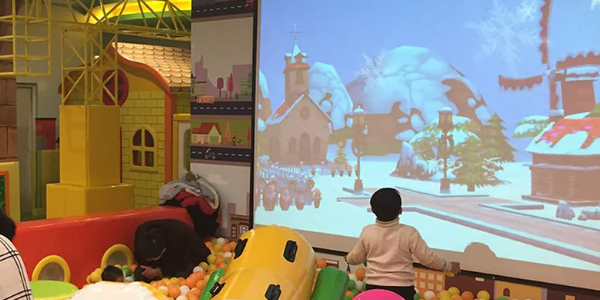
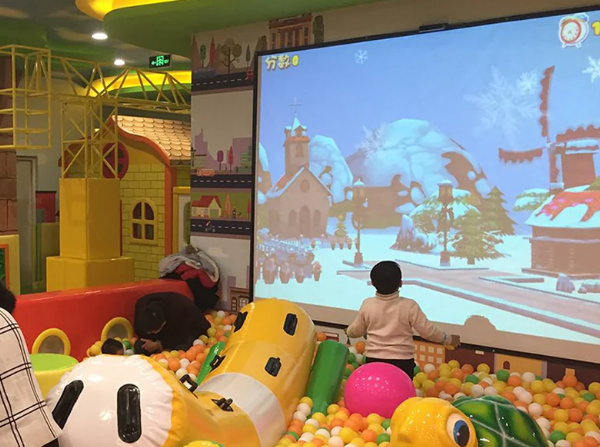
In an immersive sports game, a player steps onto a projected target, touches a virtual button, or approaches an interactive wall. Almost immediately, the digital scene changes: a target disappears, a score increases, or a new challenge begins.
To the player, the interaction appears simple. But behind the experience is a coordinated system of LiDAR sensing, spatial calibration, event processing, and real-time game rendering.
For developers and audiovisual (AV) system integrators, the real engineering challenge is not simply detecting movement. It is determining whether a detected object represents a valid game interaction, identifying where that interaction occurred, and triggering the correct response.
This distinction is especially important in immersive sports applications, where multiple participants, fast movements, and physical objects can create complex detection conditions.
CPJROBOT develops PoE LiDAR sensing solutions for interactive walls, floors, and customized projection environments. Its F1 and M1 LiDAR products, together with LiDAR Touch software and SDK resources, can support different types of position-based interaction.
In this technical guide, we examine how a LiDAR interactive projection system works, how sensor coordinates become gameplay events, what different sports applications require, and how to validate system performance before opening a commercial venue.
1. What Components Make Up a LiDAR Interactive Projection System?
A complete LiDAR interactive projection system is more than a laser sensor connected to a projector.
It consists of several functional layers that must operate together.
1.1 LiDAR Sensing Layer: Detecting Objects in a Scanning Plane
LiDAR stands for Light Detection and Ranging.
A LiDAR sensor emits laser light and measures returned signals to estimate distances to surrounding objects.
In many interactive projection installations, a 2D LiDAR sensor scans a defined plane. Objects that intersect that plane can produce measurable returns.
For example:
- A hand approaching an interactive wall may enter the configured detection plane.
- A shoe crossing a low scanning plane may generate a detectable floor interaction.
- A person entering a designated area may create a position-based event.
- A soft ball passing through a sensing plane may produce a brief return, depending on its size, speed, and the sensor geometry.
The sensor itself measures spatial information. It does not inherently understand whether a detected object is a hand, a football, or a person.
That interpretation must come from additional processing, application logic, or other sensing technologies.
1.2 Data Processing Layer: Converting Measurements into Usable Coordinates
Raw LiDAR measurements are not immediately suitable for game control.
The system must transform sensor readings into a representation that the application can understand.
Depending on the device and software configuration, processing may involve:
- Receiving distance and angle measurements.
- Converting measurements into local spatial coordinates.
- Removing background points and unwanted noise.
- Identifying points or clusters within the active region.
- Applying configurable thresholds.
- Mapping valid detections to interactive coordinates.
- Generating events for the game application.
For example, a group of detected points near the floor may be converted into a single interaction location.
This location can then be tested against a virtual target within the game.
1.3 Coordinate Mapping and Calibration Layer
The sensor and projector do not naturally use the same coordinate system.
The LiDAR measures positions relative to its own location and orientation.
The game engine, however, typically defines interaction elements using screen coordinates, normalized coordinates, or virtual-world coordinates.
A calibration process establishes the relationship between these systems.
Without accurate calibration, a player could touch one location while the game responds at another.
1.4 Game Engine and Feedback Layer
The game engine receives interpreted interaction events and decides what should happen.
For example:
Detected position → Target overlap → Valid interaction → Score update → Animation and sound
Unity is one possible environment for implementing this logic.
CPJROBOT also provides integration resources involving TUIO and SDK-based data interfaces for supported products.
The complete application may control:
- Target activation
- Score calculations
- Timers and countdowns
- Player or team states
- Game transitions
- Animation effects
- Sound feedback
- Session results
Importantly, game software should distinguish sensor observations from confirmed gameplay events.
A detected object entering a target zone does not automatically mean the player has successfully performed the intended action.
2. From LiDAR Data to Game Events: The Complete Interaction Pipeline
Consider a projected floor game where participants must step on highlighted circles.
When someone approaches a target, the LiDAR detects an object intersecting the configured sensing plane.
The software then determines whether the detected position corresponds to an active game target.
A typical processing workflow is:
LiDAR Scan → Point Processing → Interaction Detection → Coordinate Transformation → Game Logic → Visual and Audio Feedback
Step 1: Collect Distance Measurements
For a scanning LiDAR, measurements can be expressed as a distance and angle relative to the sensor.
In a simplified two-dimensional model, the position of a measured point can be calculated using:
x = r × cos(θ)
y = r × sin(θ)
Where:
- r is the measured distance.
- θ is the scanning angle.
- x and y represent coordinates in the sensor’s local reference frame.
These coordinates describe where the sensor detected a reflecting object.
They do not yet identify the corresponding pixel on the projection surface.
Step 2: Identify Candidate Interactions
The software evaluates whether detected points belong to the intended interaction area.
For a floor game, this could mean identifying points within a designated rectangular or polygonal region.
For a wall game, it could involve detecting an object close to the calibrated interaction plane.
Processing may include:
- Detection-region filtering
- Background subtraction
- Point clustering
- Temporal filtering
- Minimum-size thresholds
- Interaction-state tracking
The exact functions depend on the LiDAR model, firmware, SDK, and middleware.
Step 3: Convert the Position into Projected Coordinates
Once a candidate interaction has been identified, its position must be mapped into the coordinate system used by the projected game.
For example, the application may use a normalized coordinate range between 0 and 1.
A point at approximately (0.5, 0.5) could represent the center of the calibrated interaction area.
The game engine can then translate that normalized position into screen pixels or virtual scene coordinates.
Step 4: Evaluate the Game Rules
Suppose a virtual target occupies a defined region on the projection.
The game software checks whether the incoming interaction coordinate falls inside that region.
If the game rules are satisfied, it generates a scoring event.
Developers may also apply additional conditions, such as:
- The target must currently be active.
- The interaction must enter the target rather than remain continuously present.
- The player must activate targets in the correct order.
- Repeated detections within a short period should not create duplicate scores.
Step 5: Return Visual and Audio Feedback
After confirming an interaction, the game engine updates the projected content.
A successful target activation might produce:
- A color change
- A particle animation
- A scoring notification
- A sound effect
- A new target
- A multiplayer scoreboard update
The quality of the experience depends on how consistently and quickly this complete sequence operates.
3. How Are LiDAR Coordinates Mapped to Interactive Walls and Floors?
Interactive projection calibration is one of the most important stages of system integration.
The sensor and projected image may cover the same physical surface, but they use different coordinate systems.
Calibration creates a mathematical relationship between detected physical positions and digital game positions.
3.1 Understanding Sensor Coordinates and Projection Coordinates
Imagine a wall projection measuring 6 meters wide and 3 meters high.
The projector displays a game at a resolution of 1920 × 1080 pixels.
The LiDAR detects positions in physical space, while the game engine processes positions within the projected image.
A simplified calibration can establish relationships between known physical points and their corresponding screen positions.
For example:
| Physical Interaction Position | Normalized Screen Position |
|---|---|
| Upper-left corner | (0, 0) |
| Upper-right corner | (1, 0) |
| Lower-left corner | (0, 1) |
| Lower-right corner | (1, 1) |
| Center | (0.5, 0.5) |
These coordinates are illustrative. Actual coordinate orientation and calibration methods depend on the software and installation.
3.2 Four-Point Calibration
For a flat, planar interaction area, four-point calibration is a common method of establishing coordinate correspondence.
The installer identifies reference positions in the physical sensing area and matches them to corresponding points in the projected display.
A homography-based transformation may then be used to map points between the two coordinate systems.
The general relationship can be expressed as:
[u’, v’, 1] ∝ H × [x, y, 1]
Where:
- x and y are coordinates in the calibrated sensor-plane representation.
- u’ and v’ are mapped projection coordinates.
- H is a 3 × 3 projective transformation matrix.
The exact transformation method depends on the integration software and physical geometry.
This is a conceptual model rather than a claim that every CPJROBOT software version internally uses the same algorithm.
3.3 Why Wall and Floor Calibration Are Different
Although both use coordinate mapping, interactive walls and floors have different physical requirements.
Wall interaction
The scanning plane must be positioned appropriately relative to the projected wall.
Developers must decide whether a game should respond to near-surface proximity or an inferred touch event.
LiDAR proximity detection should not automatically be considered proof of physical contact.
Floor interaction
A sensor may be positioned to detect feet or objects intersecting a scanning plane near the floor.
However, a 2D sensor generally cannot determine foot pressure, body posture, or whether a player has fully jumped unless additional information is available.
The scanning height also affects which objects can be detected.
3.4 Why Calibration Accuracy Matters in Sports Games
In a digital museum exhibit, a small positioning error may be noticeable but manageable.
In a sports game with small targets and competitive scoring, the same error can create disputes about whether an interaction should count.
Calibration testing should therefore include:
- Center-point accuracy
- Edge and corner positions
- Different approach directions
- Repeated interactions at the same location
- Movement across target boundaries
- Positions close to the sensor
Where projectors use geometric correction or edge blending, calibrate against the final displayed image rather than the original uncorrected video frame.
4. Steps, Touches, and Ball Impacts: What Can Different LiDAR Systems Actually Detect?
Not all interactive sports activities require the same sensing capabilities.
A critical part of system design is defining the physical action that represents a valid input.
4.1 Footstep and Floor-Zone Interaction
Footstep-oriented games are among the more practical applications for appropriately positioned 2D LiDAR.
When a shoe or other object intersects the configured scanning plane, the system may generate a location-based detection.
That information can support:
- Stepping onto projected targets
- Entering predefined floor zones
- Activating virtual floor buttons
- Triggering animations near a player’s feet
- Following position-based game sequences
What must be verified?
- Does the player’s footwear reliably intersect the scan plane?
- Can the system distinguish separate interaction zones?
- Are targets spaced far enough apart?
- Does sensor placement cause occlusion?
- Are interactions still detected near the edges?
A low scanning plane can provide useful location information, but it does not inherently measure body weight or complete gait patterns.
4.2 Hand Touch and Wall Interaction
For wall-based sports games, an interactive LiDAR sensor can detect objects entering a configured plane near the surface.
The game may interpret certain events as touch-like inputs.
Applications can include:
- Digital reaction walls
- Target activation games
- Interactive scoreboards
- Sports-themed selection interfaces
- Large interactive projection screens
What must be verified?
- Can the intended hand position be detected?
- Is the sensing plane correctly aligned with the projected surface?
- Can nearby objects cause false triggers?
- Are two closely spaced interactions distinguishable?
- Does the application require actual contact or only proximity?
For applications requiring verified physical contact, a dedicated touch surface may be more appropriate than proximity-based sensing alone.
4.3 Ball-Throwing and Ball-Impact Games
Ball games are more challenging because the detected object may move rapidly through a thin scanning plane.
For example, a soft ball approaching an interactive wall could intersect the LiDAR scan briefly before rebounding.
Whether the event is detected depends on several factors:
- Ball diameter and surface characteristics
- Ball speed and trajectory
- LiDAR scanning frequency
- Angular resolution
- Distance from the sensor
- Scanning-plane offset
- Occlusion from other balls or players
- Detection and filtering algorithms
A sensor capable of detecting hands does not automatically provide reliable detection of every fast-moving ball.
For a projected football goal or ball-throwing wall, engineers should test actual balls at the intended speed and impact locations.
If the application requires ball-flight trajectories, precise impact timing, or verification of physical contact, additional sensing technology may be necessary.
4.4 Full-Body Motion and Gesture Recognition
A 2D LiDAR measures spatial information within its scanning plane.
It should not be confused with a complete three-dimensional motion-capture system.
For example, a sensor configured near floor level may detect position changes as a player moves.
However, that does not automatically provide information about:
- Arm angles
- Knee positions
- Full-body skeletons
- Jump height
- Detailed kicking technique
- Three-dimensional gestures
Applications requiring these measurements may need depth cameras, 3D sensing, wearable motion trackers, or sensor fusion.
Detection Capability Comparison
| Interaction Requirement | 2D Interactive LiDAR Suitability | Additional Considerations |
|---|---|---|
| Floor-zone activation | Suitable for evaluation | Scanning height and footwear detection |
| Wall touch-like interaction | Suitable for evaluation | Proximity threshold and calibration |
| Player position in a defined plane | Possible | Occlusion and tracking stability |
| Multiple simultaneous touchpoints | Possible | Target spacing and software processing |
| Fast-moving ball detection | Requires specific validation | Speed, size and scanning geometry |
| Precise ball-impact measurement | Not guaranteed | May require dedicated impact sensing |
| Full-body skeletal tracking | Not provided by a basic 2D scan | Consider depth or motion-capture sensors |
| Jump-height measurement | Not directly provided | Additional sensing required |
Engineering takeaway: Choose the sensor according to the information the game actually needs, not simply according to the type of sport being simulated.
5. Multiplayer Interactive Sports Games: Occlusion, Latency, and Tracking Stability
Multiplayer games create different sensing challenges from single-player installations.
The problem is not only how many objects the sensor can detect.
It is whether the system can separate relevant interactions, maintain usable tracking information, and process events consistently.
5.1 Understanding Occlusion
Occlusion occurs when one object blocks the sensor’s view of another object.
For example, two players may stand along similar lines of sight from a single LiDAR sensor.
The closer player can prevent the sensor from observing part of the area behind them.
In sports games, occlusion may result from:
- Players standing close together
- Multiple feet occupying a small region
- Objects blocking the wall’s detection plane
- Large physical props
- Balls passing in front of participants
A wider field of view does not eliminate every occlusion problem.
Possible solutions include adjusting the sensor position, changing the interaction layout, and considering multiple sensing viewpoints.
5.2 What Does Sensor Refresh Rate Mean for Gameplay?
The CPJROBOT F1 supports scanning rates of up to 30 FPS.
At 30 FPS, a new scan is generated approximately every 33.3 milliseconds.
However, sensor scanning rate is not equivalent to total system latency.
The full response delay may include:
Sensing + Data Transmission + Processing + Game Engine Update + Rendering + Display
For example, even if the sensor detects an interaction promptly, the projected game can still appear slow if the control computer is overloaded or the projector introduces significant display delay.
Integrators should measure end-to-end responsiveness rather than relying on the sensor’s frame rate alone.
5.3 Multi-Point Detection vs. Player Identification
These are two different capabilities.
Multi-point detection means the system can report more than one detected interaction or position.
Player identification means the system can determine which participant generated a particular event.
Multiple detected points do not automatically correspond to separately identified players.
If a sports game requires individual score attribution, developers must establish an appropriate method of associating events with participants.
Possible approaches include:
- Assigning fixed player zones
- Using separate lanes
- Tracking objects across successive scans where supported
- Integrating additional identification methods
For commercial team games, fixed zones may be simpler and more robust than attempting to identify every participant individually.
5.4 How to Evaluate Multiplayer Stability
Instead of testing only one participant, system integrators should evaluate realistic game conditions.
Useful tests include:
Simultaneous interaction test: Ask multiple players to activate different targets at the same time.
Occlusion test: Position participants along overlapping lines of sight.
Close-target test: Activate adjacent targets to assess whether events remain separated.
Rapid repetition test: Repeat interactions quickly and observe whether the software generates missed or duplicate events.
Long-session test: Operate the game continuously to observe changes in responsiveness, tracking state, or software stability.
The objective is to establish repeatable performance under the expected operating conditions, not to assume unlimited multiplayer capability from the sensor specification.
6. Integrating CPJROBOT PoE LiDAR with Unity and Interactive Software
For developers creating customized immersive sports games, the integration interface is an important purchasing consideration.
CPJROBOT provides software and SDK resources that can connect supported LiDAR products with external applications.
6.1 The Role of LiDAR Touch
LiDAR Touch serves as the interaction configuration and processing layer in supported CPJROBOT workflows.
Depending on product and software version, it can help configure the interactive region and deliver position or touch-like data to an application.
The software should be evaluated against the project’s required input format, operating system, calibration workflow, and detection behavior.
6.2 Using TUIO for Multi-Touch Interaction
TUIO is a protocol used to communicate touch and object-tracking information between interactive systems.
In an appropriate CPJROBOT integration workflow, processed LiDAR events can be transmitted to software using a supported TUIO interface.
A Unity application can then receive interaction coordinates and convert them into game actions.
A typical architecture is:
CPJROBOT LiDAR → LiDAR Touch / SDK Middleware → TUIO or Supported Interface → Unity → Game Feedback
For example, a Unity script might receive a touch position and determine whether it overlaps a target.
If the target is active and the event satisfies the game’s rules, Unity updates the score.
6.3 Event States Matter
For many sports games, recording only a position is insufficient.
The software may also need to determine whether the interaction is beginning, continuing, or ending.
A useful event model includes:
- Enter: An object enters an interaction region.
- Move: The detected position changes.
- Stay: The object remains within the region.
- Exit: The object leaves the region.
These states can help prevent scoring repeatedly while a participant holds a hand over the same target.
For example, the game might award points only when an interaction enters an active target region.
This logic is implemented at the appropriate middleware or game-application layer.
6.4 Why Developers Should Test with Real Sensor Data
A game may function correctly with mouse clicks or simulated touch events but behave differently when connected to physical LiDAR hardware.
Real-world signals may contain:
- Coordinate jitter
- Temporary occlusion
- Repeated detections
- Missing points
- Changes in object shape
- Background interference
Before deployment, developers should test the complete system using representative physical interactions.
This is particularly important for competitive games where scoring consistency affects the user experience.
7. From Installation to Calibration: A Commissioning Checklist for Sports Game Projects
System commissioning should verify more than whether the LiDAR successfully connects to the computer.
A complete acceptance process checks the sensing geometry, calibration, event logic, and game response under realistic conditions.
Phase 1: Confirm the Intended Interaction
Before installing hardware, clearly define:
- The physical object being detected
- The required interaction region
- Whether proximity or contact is expected
- The number of simultaneous participants
- The acceptable position error
- The acceptable response delay
- Any requirements for individual player identification
This prevents the project from depending on sensing capabilities that were never established.
Phase 2: Verify Sensor and Projection Geometry
Check that the LiDAR scanning plane intersects the intended objects at the appropriate position.
For wall projects, inspect the relationship between the scan plane and projection surface.
For floor projects, verify the sensor height, orientation, and coverage of the active zones.
Also check:
- Projector alignment
- Mounting stability
- Obstructions
- Reflections
- Network connectivity
- Power availability
Phase 3: Complete Coordinate Calibration
Use the supported CPJROBOT calibration workflow to establish the relationship between the sensing region and projected image.
After calibration, validate reference points across the full interaction surface.
Do not assume that accurate detection at the center guarantees accurate interaction at the edges.
Phase 4: Tune Event Detection
Test the physical actions that participants will actually perform.
For each interaction type, evaluate:
- False triggers
- Missed detections
- Position jitter
- Duplicate events
- Detection consistency
- Interaction boundary behavior
Where supported, adjust the relevant filtering and threshold parameters.
Avoid using excessive smoothing or debounce settings if they cause legitimate fast interactions to be ignored.
Phase 5: Test Full-System Performance
Run the actual game application with the intended projector and computer.
Measure responsiveness from physical action to visible feedback.
Check whether performance changes when several participants interact at the same time.
For multiplayer games, also confirm the accuracy of scoring and player-zone assignments.
Phase 6: Document and Save the Configuration
After successful calibration, record:
- Sensor mounting position
- Projector position
- Network configuration
- Calibration settings
- Software versions
- Game build version
- Detection thresholds
- Test results
Back up configuration files where supported.
If the projector or sensor is moved later, the system should be checked and recalibrated as necessary.
8. Which CPJROBOT LiDAR Solution Fits Your Interactive Sports System?
CPJROBOT offers PoE LiDAR products for different sensing geometries and interactive projection requirements.
For sports game development, sensor selection should begin with the interaction model and physical space.
CPJROBOT F1 PoE LiDAR
The F1 uses 2D Time-of-Flight sensing with a 270° scanning field of view and a scanning rate of up to 30 FPS.
It is a potential option for interactive wall and floor projects requiring wide-angle sensing.
Typical applications to evaluate include:
- Large interactive projection walls
- Floor target games
- Position-based sports interactions
- Multi-point interactive installations
- Customized Unity-based digital experiences
CPJROBOT M1 PoE LiDAR
The M1 offers a 360° scanning configuration.
It may be suitable for projects where the desired sensing geometry benefits from all-around horizontal coverage.
However, a 360° scanning angle does not mean the sensor provides complete 3D body tracking.
Sensor position, practical detection distance, and the required interaction plane still determine whether the device is suitable.
Multi-LiDAR Integration
For larger or more complex installations, multiple LiDAR sensors may be required.
Possible examples include:
- Extended interactive sports walls
- Multi-zone floor games
- Irregular projection environments
- Areas with significant occlusion
- Combined wall and floor experiences
Multi-sensor installations introduce additional requirements for coordinate alignment, network configuration, overlap management, and event synchronization.
These requirements should be addressed during system design rather than left until the final installation stage.
Free Software and SDK Resources
CPJROBOT provides downloadable resources for supported products, including:
- LiDAR Touch software
- Interactive game test resources
- F1 SDK
- M1 SDK
- Product documentation
Developers can use these resources to evaluate sensing data and build application-specific interaction logic.
The availability of a sensor SDK does not mean every sports game or recognition algorithm is included as a ready-made feature.
9. Frequently Asked Questions About LiDAR Interactive Projection for Sports Games
Q1. How does LiDAR interactive projection detect player movement?
A LiDAR sensor measures distances to objects intersecting its sensing area. Processing software converts those measurements into coordinates or interaction events. The game engine then determines whether those events should trigger a response.
Q2. Can 2D LiDAR recognize complete human body movements?
No. A basic 2D LiDAR measures information within its scanning plane. Full-body skeletal tracking, detailed posture recognition, and 3D motion capture generally require additional sensing technology.
Q3. Can LiDAR detect players stepping on projected floor targets?
Yes, suitable 2D LiDAR installations can detect feet or objects intersecting a configured plane near the floor. Detection performance depends on mounting geometry, footwear, target dimensions, and calibration.
Q4. Can LiDAR detect footballs or balls hitting an interactive wall?
Potentially, but reliable detection of high-speed balls must be validated for the actual sensor, ball size, speed, trajectory, and installation. A sensor designed for touch-like interactions should not automatically be assumed to detect every ball impact.
Q5. Why is coordinate calibration necessary?
The LiDAR and projector use different coordinate systems. Calibration aligns measured sensor positions with the projected image so that the game responds at the intended location.
Q6. Does 30 FPS mean a sports game has zero latency?
No. A 30 FPS scanning rate describes how frequently the sensor updates its measurements. Total interaction latency also includes data processing, software updates, graphics rendering, and display delay.
Q7. Can multiple players interact simultaneously?
Multiple interactions can be supported when the sensing coverage and software are suitable. However, simultaneous detection, persistent player tracking, and individual player identification are separate capabilities that must be evaluated.
Q8. Can CPJROBOT LiDAR be integrated with Unity?
Yes. CPJROBOT provides SDK resources and documented integration workflows involving Unity and TUIO for supported products. Developers should verify interface compatibility and the required application functionality.
Q9. What should be tested before launching a commercial interactive sports game?
Important tests include sensing coverage, position accuracy, false-trigger frequency, missed interactions, multiplayer occlusion, response latency, scoring consistency, and long-session stability.
Q10. Where can developers download CPJROBOT software and SDKs?
CPJROBOT provides supported software, SDKs, and documentation through its official download center at https://www.poelidar.com/download-center/.
Conclusion: Reliable Interactive Sports Games Begin with Reliable Interaction Data
LiDAR interactive projection creates a connection between physical activity and digital game content.
But a reliable sports interaction system requires much more than simply connecting a sensor to a projector.
Developers must understand what the sensor can actually detect, how physical positions are converted into game coordinates, and how software determines whether an interaction is valid.
For floor target games, the priority may be stable position detection.
For wall interaction, it may be accurate coordinate mapping and touch-like event generation.
For ball-based sports games, it may be validating short-duration object detection under realistic conditions.
For multiplayer applications, occlusion management, event processing, and player attribution become increasingly important.
CPJROBOT PoE LiDAR solutions, including the F1 and M1 models, provide sensing and integration options for interactive projection projects.
Combined with appropriate calibration, compatible software, and carefully designed gameplay logic, these technologies can help developers create responsive interactive sports environments.
Developing a LiDAR-Based Interactive Sports Game?
Whether you are building a digital sports wall, a movement-responsive floor, or a customized multiplayer sports attraction, CPJROBOT can help you evaluate the sensing requirements of your project.
To discuss a suitable solution, share:
- Your interactive wall or floor dimensions
- The physical actions your game must detect
- The expected number of participants
- Your software platform, such as Unity or TouchDesigner
- Your required accuracy and responsiveness
- Your installation environment
Explore CPJROBOT PoE LiDAR sensors and software resources:
Website: https://www.poelidar.com/
Software and SDK Downloads: https://www.poelidar.com/download-center/
CPJROBOT — Connecting Physical Interaction with Digital Experiences.