

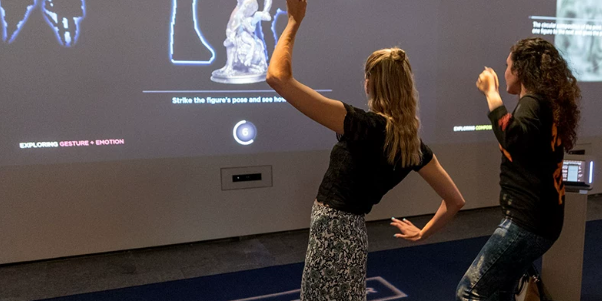
A family approaches an interactive exhibit. One person selects a city, another explores its trade connections, and a third uncovers objects discovered along the route. Their contributions gradually complete a shared story.
Making this experience work requires more than detecting several inputs. The exhibit must understand which actions can happen independently, which affect everyone, and what to do when visitors compete for the same object.
Multi-user museum interactive projection combines simultaneous sensing with software that manages shared participation. LiDAR can supply spatial measurements, while tracking and content software turn those measurements into coordinated activities.
For museums, the result can be an exhibit that accommodates families, school groups, and independent visitors within the same experience.
Why Museums Need Multi-User Interaction
A single-user interface often places one visitor in control while others watch. That arrangement can suit a focused individual activity, but it may limit participation when groups arrive together.
Multi-user interactive exhibits give several people meaningful actions at the same time. They can support:
- Family discussion: Adults and children compare discoveries and make decisions together.
- Group learning: Students contribute different pieces of evidence to a shared task.
- Independent exploration: Visitors investigate separate objects without interrupting one another.
- Flexible participation: New arrivals can join while others finish.
There is also an operational opportunity: more visitors may participate within the available exhibit space. However, higher capacity is not automatic. Confusing instructions, crowded controls, or long sessions can still create queues.
The useful question is: how many visitors can participate meaningfully and comfortably at once?
Single-Point Input, Multiple Inputs, and Visitor Tracking Are Different
“Supports multiple users” can describe several capabilities. A procurement specification should distinguish them.
| Capability | What the system does | Suitable exhibit behavior |
|---|---|---|
| Single-point input | Processes one active interaction at a time | One visitor selects a topic |
| Multiple simultaneous inputs | Processes several positions or selections together | Visitors activate separate objects |
| Multi-target tracking | Associates detections across successive measurements | Effects follow moving targets |
| Persistent participant assignment | Maintains a visitor’s role or progress during an activity | Individual missions within a shared experience |
Detecting multiple points does not automatically mean identifying multiple people.
One person may generate several detections through hands, feet, or other objects. Nearby people may produce measurements that are difficult to separate. A tracking ID is also a temporary software label, not proof of a visitor’s identity.
Many museum activities do not need persistent participant assignment. If each section of a display works independently, the application may only need to know where an action occurred.
How LiDAR Supports Multiple Visitor Positions
LiDAR supplies distance measurements across its field of view. A typical processing pipeline can turn these measurements into multiple interaction targets:
- Exclude irrelevant measurements. Remove fixed background features and areas outside the exhibit.
- Group nearby measurements. Form candidate objects or interaction points.
- Estimate positions. Convert each candidate into coordinates usable by the application.
- Associate detections over time. Where tracking is required, match new detections with existing tracks.
- Handle uncertainty. Decide how to respond when targets merge, disappear, or reappear.
The exact pipeline depends on the sensor, middleware, and application. These steps should not be assumed to be built into every LiDAR device.
For a 2D system, measurements describe objects intersecting a scan plane. They do not inherently provide full-body understanding. When visitors cross paths or block one another, the software may lose continuity or exchange track assignments.
This distinction affects content design. An anonymous shared animation can tolerate a temporary tracking interruption more easily than a game that must preserve each participant’s personal score.
Divide the Experience Before Dividing the Screen
A large projection does not become a successful group exhibit simply by adding more buttons. Visitors need to understand where they can act and how their actions affect others.
Three interaction structures are particularly useful.
Independent Exploration Zones
Each region has its own controls and content state.
For example, several visitors can investigate different artifacts simultaneously. Opening information about a ceramic vessel should not close another visitor’s explanation of a bronze tool.
Keep selections and resets local to each region. Reserve changes to the entire display for clearly signposted shared moments.
Separate Contributions to a Shared Goal
Participants work in different areas, but their results feed a common display.
A family might investigate transport, water supply, food production, and architecture. Each contribution adds a layer to a reconstructed city.
The design should show both individual feedback and collective progress. This helps visitors understand why their action matters to the group.
Coordinated Group Decisions
Some experiences benefit from a deliberate shared choice, such as selecting which evidence best supports an interpretation.
Instead of allowing one accidental input to change the entire scene, the application can use a confirmation stage or collect responses before revealing the result.
These are suggested content structures, not claims about standard functions included with a particular sensor.
Preventing Occlusion, False Inputs, and Control Conflicts
Multi-user reliability involves both sensing and interaction rules.
Give Important Areas More Than One Useful View
A visitor can block another from a sensor’s line of sight. Additional viewpoints may reduce these blind spots when the installation supports multiple sensors.
Overlapping coverage requires coordinate alignment and duplicate-detection handling. Otherwise, one action may appear twice.
CPJROBOT documents multi-device support for M1 installations, but sensor scalability alone does not establish a guaranteed participant count. CPJROBOT M1 installation guide
Define Who Controls a Shared Object
If two visitors try to move the same item, the application needs a predictable rule.
Possible approaches include:
- Giving temporary control to the first valid selection.
- Requiring release before another visitor takes over.
- Providing separate copies for independent manipulation.
- Replacing dragging with a shared selection or voting action.
Show ownership visually—for example, with an outline or label—so visitors understand why an object responds to one input.
Use Deliberate Activation for Consequential Actions
A brief hold or confirmation can help distinguish intentional choices from passing movement. This is especially useful for restarting an activity or submitting a group answer.
Avoid applying the same delay everywhere. Exploratory effects should still respond promptly.
Recover Gracefully When Tracking Is Lost
If a target disappears briefly, consider pausing its action rather than immediately deleting progress. Release abandoned controls after an appropriate timeout.
Where a task truly needs persistent identity, validate the complete tracking approach. A simple zone-based role may be more dependable than expecting software to recognize the same visitor after they leave and return.
Group Activities for Families, Schools, and Tour Groups
The following concepts focus on collaboration rather than repeating a single-person activity across a larger screen.
Families: Build a City from Different Perspectives
Give family members complementary roles: planner, trader, builder, or researcher.
Each role examines different information. Their choices contribute to a shared city map, revealing how infrastructure and daily life connect.
Allow roles to remain optional so smaller families can still finish the experience.
School Groups: Reconstruct an Event from Evidence
Assign teams different source materials, such as an object, a map, an eyewitness account, or a dated record.
Students place their findings within a shared sequence, then compare interpretations. The final display explains which conclusions are supported and where uncertainty remains.
This creates an opportunity for discussion rather than rewarding only the fastest response. Historical claims and reconstructions should be checked against the museum’s curatorial sources.
Tour Groups: Explore Objects in Parallel
Visitors select different objects within a shared collection display. Each discovery adds a connection to a central theme, such as trade, migration, craftsmanship, or everyday life.
Use local captions and controlled audio so simultaneous selections do not create competing narration.
An open-ended format lets a guide gather the group without requiring every visitor to finish the same sequence.
Evaluating CPJROBOT M1 and T1 for Multi-User Exhibits
CPJROBOT is a manufacturer of LiDAR sensors, including the M1 and T1 models. For exhibition integrators, both are candidates for evaluation as part of a complete sensing and content system. CPJROBOT manufacturer website
CPJROBOT M1
M1 offers 360° scanning and Power over Ethernet. It is worth considering when a project benefits from a wide scanning angle and combined power-and-data cabling.
For group installations, evaluate how the proposed sensor positions cover occupied interaction zones—not just the empty exhibit. CPJROBOT’s published M1 guidance also describes multi-device installation capabilities. CPJROBOT M1
CPJROBOT T1
T1 is worth evaluating when its specifications and integration resources match the project. CPJROBOT provides a dedicated T1 Viewer and an open SDK, giving developers resources to inspect data and build an appropriate processing workflow. CPJROBOT T1, CPJROBOT Download Center
Neither recommendation implies a verified maximum number of simultaneous visitors. Capacity depends on sensor coverage, software limits, target separation, and the interaction itself.
Free Testing Software
CPJROBOT provides free testing software to help evaluate its LiDAR hardware. Available resources include LiDAR Touch for supported PoE sensors, test content, T1 Viewer, and SDK downloads for M1 and T1. Confirm the appropriate package for the selected model. Software information, Testing software and SDKs
Use these resources to examine simultaneous detections and integration behavior. Group tasks, shared-object rules, and visitor progress management belong to the application layer and may require custom development.
Verify Group Capacity with Realistic Scenarios
Before accepting a claim such as “supports ten users,” define what those users will actually do.
A useful acceptance test includes:
| Test scenario | What to observe |
|---|---|
| Everyone interacts at once | Whether valid actions remain responsive |
| Two visitors cross paths | Whether tracks switch or progress transfers |
| Two people select one object | Whether the ownership rule stays predictable |
| Someone blocks a sensing direction | How the experience handles missing input |
| A participant leaves mid-task | Whether controls and roles become available again |
| New visitors join an active session | Whether they can understand and enter the activity |
For operational evaluation, measure successful participants per session, waiting time, completion rate, and staff interventions. Compare these results with the space and staffing the exhibit requires.
More simultaneous inputs are valuable when they lead to more successful participation.
Planning a multi-user museum interactive projection exhibit? Share your expected group size, shared-task design, and tracking requirements with CPJROBOT. Request the current M1 and T1 specifications and use the manufacturer’s free testing software to evaluate the complete interaction under realistic group conditions.
Explore CPJROBOT LiDAR sensors · Access free testing resources