
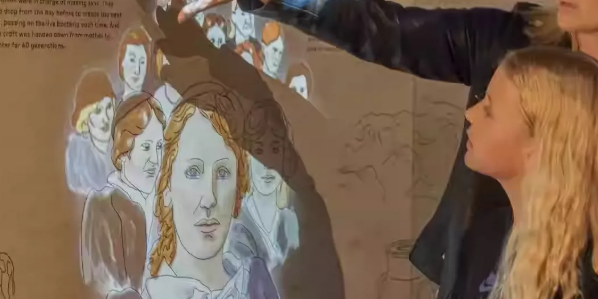
Static exhibits have long been the backbone of history museums. Glass cases, printed labels, and fixed timelines present information, but they rarely invite physical participation. As visitor expectations shift toward immersive and participatory experiences, museums are turning to wall interactive projection to make historical content feel immediate, tangible, and alive.
This article explores how interactive projection walls work in historical museums, what makes them effective, and how hardware such as the CPJROBOT M1 and T1 radar sensors supports reliable multi-user interaction. These LiDAR-based devices are manufactured by CPJROBOT and come with free testing software, making them practical options for exhibition design teams.
Static Wall Displays Face Growing Limitations
Traditional wall exhibitions serve a curatorial purpose, but they often struggle with engagement. Common problems include:
- Limited information density: Too much text overwhelms visitors; too little fails to convey historical complexity.
- One-way communication: Visitors read or observe but do not influence the display.
- Low repeat visit value: Once seen, static content rarely changes.
- Difficulty serving diverse audiences: Children, students, and international visitors may need different levels of explanation.
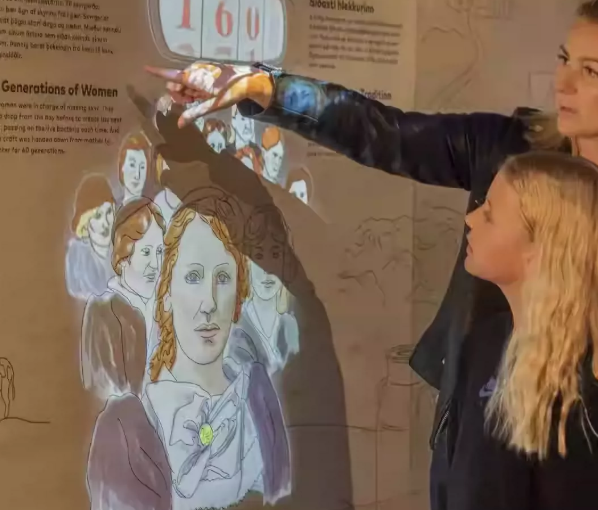
A museum wall interactive projection addresses these issues by turning the wall itself into a responsive surface. Instead of simply looking at history, visitors move, touch, point, and collaborate to reveal content.
Basic Components of a Wall Interactive Projection System
A typical interactive projection wall installation includes:
- Projector: Displays high-resolution visuals on a wall or custom surface.
- Detection system: Radar, LiDAR, infrared cameras, or depth sensors detect visitor position and gestures.
- Content engine: Software maps detected motion to visual responses in real time.
- Mounting and calibration tools: Ensure alignment between the projected image and the interactive zone.
Among detection technologies, LiDAR is increasingly favored in museum environments because it performs reliably under varying lighting conditions and does not require visitors to touch shared surfaces. The CPJROBOT M1 and CPJROBOT T1 radar sensors are designed for such interactive applications. They detect position, movement speed, and proximity, enabling smooth triggering of projected effects. CPJROBOT provides free testing software, which allows integrators to evaluate sensor behavior before full deployment.
Timelines, Historical Maps, and Artifact Information Interaction
Three content formats work especially well for historical museums:
1. Interactive Historical Timelines
A visitor walks along a projected timeline. As they move, the wall expands to show corresponding events, figures, and documents. This transforms chronology from a static graphic into a physical journey. Because LiDAR tracks continuous position, the timeline can respond progressively rather than through simple on/off triggers.
2. Historical Map Zones
When a visitor stands in front of a projected map region, the system reveals local culture, historical figures, archaeological sites, or architectural changes. Different zones can activate different content layers. For example, standing near a river route might show trade history, while standing near a city wall might display urban development.
3. Artifact Information Layers
Instead of placing dense text next to an artifact, the wall can project contextual information when a visitor points or lingers. A slow hand movement might reveal excavation photos; a pause might open a short video. This keeps the physical exhibit clean while offering deeper content on demand.
Visual Effects Triggered by Touch, Hand Waves, and Movement
The strength of interactive wall projection lies in intuitive physical triggers.
- Touch: Visitors tap projected icons to open stories, enlarge images, or rotate artifacts.
- Hand wave: A wave can dismiss an information panel or switch to another historical period.
- Body movement: Walking speed can influence how fast a timeline scrolls.
- Proximity: Standing closer may reveal fine details, while stepping back shows the larger historical context.
These interactions make visitors feel that the historical content responds to them personally. The result is stronger emotional involvement and longer dwell time.
How Multi-User Interaction Works in Practice
Museums serve families, school groups, and mixed-age audiences. A single-user kiosk often creates bottlenecks. A wall interactive projection system designed for multiple users solves this.
Key technical considerations include:
- Wide detection area: The sensor must cover a broad horizontal zone without blind spots.
- Individual tracking: The system should distinguish between multiple bodies moving simultaneously.
- Conflict resolution: When several visitors trigger different zones at the same time, content should remain coherent.
Radar and LiDAR sensors such as the CPJROBOT M1 and T1 are suitable for these multi-user scenarios. They can track multiple points across a wall-sized area and respond quickly to changing positions. This enables group interaction, such as several children exploring different regions of a digital historical map at once.
Example: A family stands in front of a large projected map of an ancient trade route. One child activates a port city; another triggers a mountain pass. The wall shows both content layers without requiring either child to wait.
Content Design Principles for Historical Wall Projections
Technology alone does not guarantee a successful exhibit. Content design determines whether the interaction feels meaningful or merely decorative.
1. Start from Historical Narrative, Not Tech Effects
Every interactive layer should serve a story. If a hand wave simply makes particles swirl, it may be visually impressive but historically empty. Instead, a hand wave could brush away modern layers to reveal an ancient street plan beneath.
2. Use Layered Information
Keep the initial surface simple. Reveal complexity through interaction. This respects visitors with different knowledge levels and prevents visual overload.
3. Design for Short Attention Spans
Most visitors engage for 30 seconds to 3 minutes. Each interaction should deliver a clear historical insight within that window.
4. Ensure Physical Comfort
Movements should not require precise gestures or extended arm raising. Natural walking, standing, and light hand movements work best.
5. Plan for High Traffic
Content should remain understandable when multiple people trigger effects at once. Avoid interactions that require complete silence or exclusive control.
Example Application Flow
Imagine a history museum creating a wall interactive projection about the Silk Road.
- A visitor walks along the projected route. The timeline expands to show key cities in chronological order.
- The visitor pauses at Dunhuang. The wall reveals cave paintings, manuscripts, and trade goods.
- Two children stand at different sections. One triggers a camel caravan animation; the other opens a map of oasis water sources.
- A guide waves a hand across the wall to reset the scene for the next group.
This type of exhibit works because the content structure matches the interactive capability. It is not a movie projected on a wall; it is a responsive historical environment.
Why Radar and LiDAR Matter for Museum Installations
Museum environments present specific technical challenges. Lighting changes throughout the day. Projection surfaces vary. Visitors range from small children to adults. Some users wear dark clothing; others stand in groups.
The CPJROBOT M1 and CPJROBOT T1 are designed to handle these conditions. They are radar-based detection solutions manufactured by CPJROBOT, suitable for interactive walls, floors, and exhibition spaces. Key advantages include:
- Stable performance in bright or dim environments.
- No requirement for visitors to wear markers or hold devices.
- Multi-point tracking capability for group interaction.
- Free testing software provided by CPJROBOT for integration and calibration.
For museums developing interactive wall exhibitions, choosing a reliable detection system directly affects visitor satisfaction. Downtime or delayed response breaks the illusion of a living wall. Evaluation teams can use the free testing software to verify sensor coverage, sensitivity, and response time before final installation.
Conclusion
Museum wall interactive projection changes the relationship between visitors and history. Instead of observing facts from a distance, audiences uncover stories through movement and collaboration. Successful projects combine thoughtful content design with dependable sensing technology.
For exhibition designers and system integrators, the CPJROBOT M1 and T1 radar sensors offer a practical path to robust multi-user interaction. With manufacturer support and free testing software, teams can prototype and deploy interactive historical walls with greater confidence.
When the wall responds, history no longer feels remote. It feels present. That is the core value of interactive projection in the modern museum.