
LiDAR Touch Accuracy Problems?
The Real Reasons Your Interactive System Feels “Off”
In many interactive projection projects, the system technically works.
The LiDAR connects normally.
The software runs.
The projection looks impressive.
But users still complain:
- “Touch response feels inaccurate.”
- “The interaction drifts.”
- “The wall tracking is unstable.”
- “The touch point is offset.”
- “Sometimes it reacts, sometimes it doesn’t.”
At CPJROBOT, we see this issue constantly in:
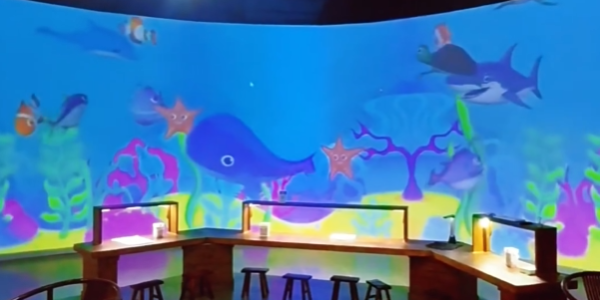
- immersive exhibitions
- interactive walls
- floor projection systems
- digital museums
- projection mapping installations
And surprisingly:
Most LiDAR touch accuracy problems are NOT caused by the LiDAR hardware itself.
They usually come from:
- installation height
- mounting angle
- reflective interference
- improper calibration
In immersive interaction systems:
small installation mistakes create huge experience differences.
Why LiDAR Accuracy Matters More Than People Think
In interactive environments, users judge the system instantly.
Even:
- 50ms delay
- slight coordinate drift
- edge-area offset
- unstable trigger zones
can make the experience feel:
- cheap
- laggy
- unreliable
Especially in:
- projection football games
- interactive graffiti walls
- children’s interaction zones
- museum installations
where users expect real-time response.
This is why professional integrators treat:
tracking accuracy = user experience.
1. Installation Height Problems
The Most Common Accuracy Mistake
One of the biggest causes of LiDAR touch calibration error is incorrect installation height.
Many installers assume:
“Higher is better.”
Not always.
If the LiDAR is mounted too high:
- point density decreases
- small movements become harder to detect
- edge accuracy becomes weaker
- touch positioning may drift
If mounted too low:
- scanning coverage shrinks
- dead zones increase
- user occlusion becomes more obvious
Real Engineering Scenario
In one interactive museum project:
the client reported unstable wall touch accuracy near the edges.
The software team adjusted calibration repeatedly.
No improvement.
The real issue?
The LiDAR had been installed nearly 1 meter higher than recommended.
After lowering the sensor:
- edge tracking improved immediately
- touch offset disappeared
- interaction became significantly smoother
No software modification was needed.
2. Installation Angle Problems
Why “Slightly Crooked” Creates Major Drift
LiDAR systems rely heavily on geometric positioning.
Even small mounting angle errors can create:
- coordinate distortion
- tracking offset
- inconsistent touch response
- warped interaction zones
Especially in:
- large interactive walls
- floor projection mapping
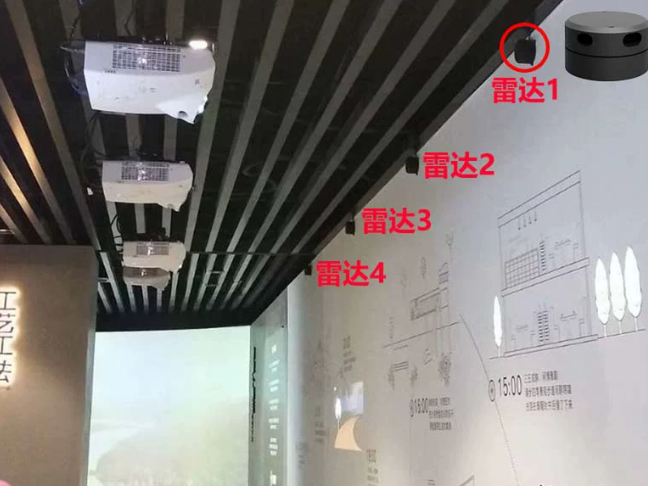
- multi-LiDAR systems
small angle deviations become amplified across the interaction area.
Common Installer Mistake
Temporary exhibition installations often use:
- quick brackets
- temporary tripods
- uneven mounting surfaces
After several hours of operation:
the angle shifts slightly.
Then:
- calibration slowly drifts
- touch accuracy degrades
- interaction zones become inconsistent
This is extremely common in touring exhibitions and temporary events.
3. Reflective Surface Interference
The Hidden Enemy of Stable Tracking
LiDAR systems perform very well in complex lighting environments.
But reflective materials can still affect tracking quality.
Common problematic surfaces include:
- mirrors
- polished metal
- glossy floors
- reflective glass
- highly reflective walls
These surfaces may create:
- ghost points
- unstable boundaries
- random triggering
- edge-area inaccuracies
Real Project Experience
In one shopping mall interactive wall project:
tracking became unstable only during daytime.
The reason was not sunlight.
It was reflection from a nearby glass storefront.
Once the installation angle was adjusted:
the issue disappeared completely.
This type of environmental interference is often underestimated during early deployment.
4. Calibration Method Problems
“Fast Calibration” Often Creates Long-Term Problems
Many installers rush through calibration during project setup.
But poor calibration creates:
- inaccurate coordinate mapping
- edge offset
- drifting interaction zones
- unstable touch response
especially after environmental changes.
Professional Calibration Workflow
At CPJROBOT, our engineers usually recommend:
Step 1
Confirm final mounting position first.
Never calibrate before the sensor is fully fixed.
Step 2
Clear unnecessary reflective objects nearby.
Step 3
Test edge-area interaction repeatedly.
Many systems only test center positioning —
while edge areas are where problems usually appear.
Step 4
Observe tracking stability during real user movement.
Not just static testing.
Why Multi-User Interaction Is More Challenging
In crowded immersive environments:
tracking complexity increases rapidly.
Especially when users:
- overlap
- move quickly
- approach edges
- trigger multiple zones simultaneously
This is why:
installation quality matters even more than theoretical sensor specifications.
Recommended Setup Tips for Better LiDAR Accuracy
✅ Stable mounting structure
✅ Correct installation height
✅ Precise horizontal alignment
✅ Avoid reflective interference nearby
✅ Recheck calibration after environmental changes
✅ Use industrial-grade brackets for long-term stability
✅ Test real interaction scenarios — not only software demos
Common Search Terms Engineers Use
This topic is often searched as:
- LiDAR accuracy issues
- LiDAR touch calibration error
- interactive wall touch offset
- projection mapping tracking drift
- LiDAR edge tracking problem
- immersive interaction calibration
- PoE LiDAR inaccurate touch
- Unity interactive wall calibration
FAQ
Why does touch accuracy drift over time?
Usually because:
- mounting structure shifts slightly
- calibration becomes misaligned
- environmental reflections change
Physical installation stability is critical.
Does installation height affect tracking quality?
Absolutely.
Incorrect height directly affects:
- point density
- edge accuracy
- coverage area
- movement recognition quality
Why are edge areas less accurate?
Because geometric distortion becomes larger near scanning boundaries.
Proper angle setup and calibration help minimize this issue.
Can reflective floors affect LiDAR systems?
Yes.
Highly reflective surfaces may create:
- ghost reflections
- unstable detection
- inaccurate triggering
especially in glossy exhibition environments.
In immersive interaction projects:
LiDAR accuracy is not only about sensor specifications.
It depends heavily on:
- installation quality
- environmental planning
- calibration workflow
- mounting stability
Professional integrators know:
the best interaction systems are built through careful environmental tuning —
not just expensive hardware.
About CPJROBOT
CPJROBOT is a professional PoE LiDAR manufacturer focused on:
- immersive interaction systems
- interactive wall & floor solutions
- projection mapping interaction
- Unity / TouchDesigner integration
- museum & exhibition installations
- multi-LiDAR deployments
Our products are designed for real engineering environments —
where stable interaction matters more than laboratory demonstrations.