The Firewall & IP Conflict Problem Most Interactive Installers Eventually Face
One of the most frustrating situations in interactive projection projects is this:
The PoE LiDAR powers on normally.
The switch lights blink.
The device appears connected.
But:
- Unity cannot detect the sensor
- TouchDesigner cannot receive data
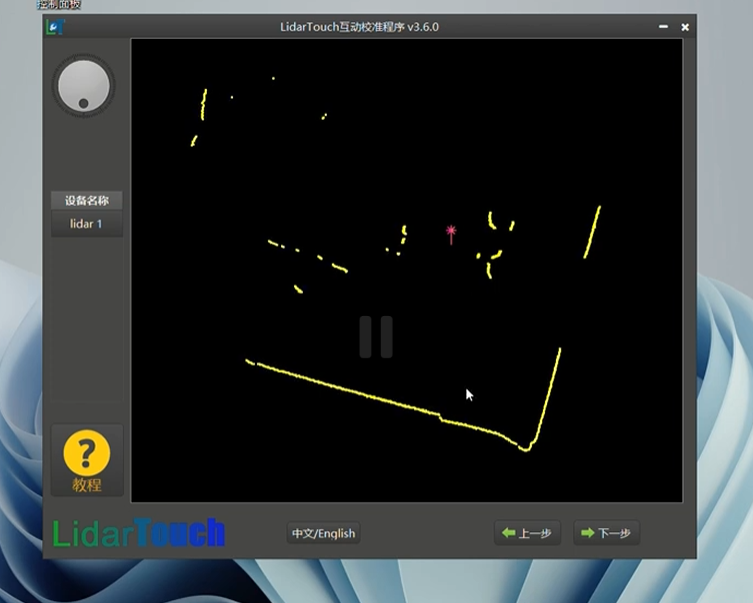
- the calibration software shows “Connection Failed”
- the LiDAR disappears randomly
- UDP communication fails intermittently
At first, many engineers suspect:
- hardware damage
- defective LiDAR units
- Ethernet cable problems
But in real installation environments, another issue is extremely common:
Windows silently blocks communication.
The Problem Is Often Not the LiDAR
In many immersive interaction projects, the LiDAR itself is actually working correctly.
The real problem comes from:
- Windows Defender Firewall
- antivirus network protection
- security software packet filtering
- IP address conflicts
- incorrect network segments
This is especially common in:
- exhibition deployments
- museum installations
- temporary event setups
- laptops used across multiple projects
- computers with aggressive security software installed
Why This Happens in Interactive Systems
PoE LiDAR systems rely heavily on:
- UDP packet transmission
- TCP/IP communication
- local device discovery
- stable LAN communication
However, many security programs treat unknown industrial devices as:
- suspicious traffic
- untrusted UDP broadcasts
- unauthorized network communication
Result:
The device exists physically —
but software communication gets blocked silently.
No warning.
No obvious error message.
Only:
“Connection Failed.”
Common Software That Causes Problems
In real-world deployments, common interference sources include:
- Windows Defender Firewall
- Huorong Security
- 360 Security
- antivirus network protection
- enterprise endpoint security software
- VPN virtual adapters
- virtual machine network drivers
Especially on exhibition computers that have accumulated years of software installations.
Real Engineering Scenario
During an interactive museum installation, engineers reported:
- LiDAR occasionally visible
- random software disconnects
- unstable sensor discovery
- calibration failures
The team replaced:
- switches
- cables
- sensors
multiple times.
But the issue remained.
The actual cause?
A third-party security program silently blocking UDP communication in the background.
After disabling the firewall temporarily:
- the LiDAR appeared instantly
- tracking stabilized
- software connected normally
No hardware replacement was necessary.
Step 1: Disable Firewalls Temporarily
During first installation:
temporarily disable:
- Windows Defender Firewall
- antivirus network protection
- third-party security software
This helps determine quickly whether the issue is software-related.
Important:
For long-term deployment:
configure proper firewall exceptions later instead of leaving protection permanently disabled.
Step 2: Run a Ping Test
One of the fastest troubleshooting methods is:
ping 192.168.0.7If there is no response:
the issue is usually:
- IP address conflict
- incorrect subnet
- different network segment
- firewall blocking ICMP
- incorrect PC Ethernet configuration
The IP Conflict Problem Most People Ignore
Interactive installations often involve:
- multiple LiDAR sensors
- projectors
- media servers
- control PCs
- routers
- unmanaged switches
If two devices accidentally share the same IP address:
communication becomes unstable immediately.
Symptoms include:
- random disconnects
- intermittent sensor visibility
- unstable TCP sessions
- delayed interaction response
This happens frequently in:
- temporary exhibitions
- rapid deployment projects
- cloned Windows systems
- manually assigned IP environments
Professional Troubleshooting Workflow
At CPJROBOT, our engineers usually check issues in this order:
Physical Layer
- PoE voltage
- Ethernet cable
- switch status
Network Layer
- ping test
- subnet verification
- IP conflict check
Software Layer
- firewall blocking
- antivirus filtering
- UDP/TCP permissions
This structured workflow avoids wasting hours replacing working hardware unnecessarily.
Recommended Network Setup for PoE LiDAR
For stable interactive system deployment:
✅ Dedicated local LAN
✅ Static IP assignment
✅ Industrial-grade switch
✅ Firewall exceptions configured properly
✅ Avoid public WiFi networks
✅ Avoid VPN adapters during setup
✅ Keep LiDAR and PC within same subnet
Common Search Terms Engineers Use
This issue is often searched as:
- PoE LiDAR connection failed
- LiDAR ping no response
- Unity cannot find LiDAR
- TouchDesigner UDP blocked
- Windows firewall blocking TCP communication
- interactive projection LiDAR offline
- PoE sensor not detected on LAN
- LiDAR IP conflict troubleshooting
FAQ
Why does the LiDAR power on but software cannot connect?
Usually because:
- firewall blocks communication
- IP addresses conflict
- PC and LiDAR are on different network segments
The hardware itself may still work normally.
Why is UDP communication important?
Many interactive systems rely on UDP for:
- real-time tracking
- low-latency interaction
- device discovery
Blocking UDP often causes invisible communication failures.
Should I disable antivirus software permanently?
No.
Only disable temporarily during troubleshooting.
After successful setup:
configure proper network exceptions.
Why do exhibition installations have more network problems?
Because temporary deployments often include:
- reused laptops
- unknown network settings
- multiple security programs
- manually configured IP addresses
- rapidly assembled LAN structures
These environments are naturally less stable.
Final Engineering Advice
In many interactive projection projects:
the LiDAR is not actually offline.
The network communication is being blocked.
Before replacing sensors or reinstalling software:
always check:
- firewall rules
- IP conflicts
- subnet configuration
- UDP/TCP permissions
- network adapters
Professional troubleshooting always starts from:
network fundamentals first.
About CPJROBOT
CPJROBOT is a professional PoE LiDAR manufacturer focused on:
- interactive projection systems
- immersive exhibition interaction
- wall & floor touch solutions
- multi-LiDAR deployments
- Unity / TouchDesigner / TUIO interaction systems
Our PoE LiDAR solutions are designed specifically for real engineering environments —
where installation stability matters more than theoretical specifications.