
A corporate showroom has a specific communication challenge: it must explain what a company does, why its products matter, and how its capabilities connect to a customer’s needs.
A presentation can introduce those ideas. An interactive environment lets visitors choose which ones to explore.
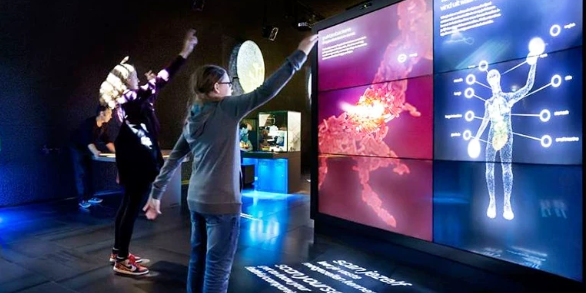
With corporate showroom LiDAR interactive projection, approaching a display can reveal a product introduction, selecting a projected component can explain its function, and moving into a demonstration zone can activate a process visualization.
The technology gives a showroom another way to respond during a customer visit. Its value depends on how clearly that response supports the company’s message.
What Is Corporate Showroom LiDAR Interactive Projection?
Corporate showroom LiDAR interactive projection uses laser-based position sensing to connect visitor activity with projected brand content.
A LiDAR sensor supplies spatial measurements. Software interprets those measurements as events—such as entering an area or selecting a location—and an application changes the projected presentation accordingly.
The installation may form part of a company exhibition hall, customer experience center, headquarters showroom, or product demonstration space.
Unlike a physical button, an interaction area can be incorporated into the display design. A projected product diagram, for example, can contain selectable regions without requiring a separate control panel.
However, the sensor is only one part of the experience. The brand graphics, product explanations, interaction rules, and presentation sequence must be developed in the content software.
How Does LiDAR Detect Visitor Positions and Actions?
LiDAR measures distance using emitted laser light and its reflections. In a 2D installation, those measurements describe objects intersecting a scanning plane.
Software can use the resulting positions to determine whether something has entered a defined region or moved between locations. The sensor does not inherently know whether that object is a customer’s hand, a presenter’s sleeve, or another obstruction.
For showroom design, it helps to distinguish three levels of interaction:
Presence: Someone enters a detection zone, prompting an introduction.
Selection: An object enters a calibrated area associated with a product or topic.
Movement: Changing positions control a visual effect or application function.
More complex behavior requires additional processing. A single 2D LiDAR does not automatically recognize facial expressions, identify a customer, or understand unrestricted three-dimensional gestures.
This is why an instruction such as “Move your hand over a highlighted component” is easier to implement predictably than “Gesture naturally to explore.”
How Projected Content Responds During a Customer Visit
A useful corporate showroom experience can be organized around the stages of a conversation.
Attract Attention
When no one is interacting, the display presents a restrained brand animation or product overview.
An approach event can reveal a clear invitation, such as “Explore the production process.” Avoid launching a lengthy presentation every time someone passes nearby.
Let Visitors Choose a Topic
A visitor selects a product family, application, or business challenge.
For example, an industrial equipment company could offer three paths: precision, maintenance, and production flexibility. Each path introduces different evidence and demonstrations.
The visitor chooses the subject; LiDAR does not infer their business needs.
Support a Product Explanation
Once a topic is selected, the content can reveal an animated cutaway, operating sequence, or comparison.
A presenter should be able to pause the interaction, return to an overview, or continue the demonstration manually. This keeps the technology useful during a guided discussion.
Return to a Ready State
When the session ends, the application can return to its opening view after an appropriate period of inactivity.
A clearly visible restart control also helps staff prepare for the next group.
Responsiveness depends on the complete chain—from sensor measurements through software to image display. The practical test is whether the visitor understands the connection between their action and the result.
Common Formats: Walls, Floors, and Product Stands
The following are proposed corporate showroom concepts, rather than claims about completed customer installations.
Interactive Walls: Explain Systems That Are Difficult to See
An interactive wall is useful when a company needs to explain relationships between products, processes, or services.
An automation supplier could display a production line. Selecting an inspection station reveals how it checks quality; selecting a handling stage explains how parts move through the process.
The wall provides a shared visual reference for a sales engineer and the visiting team. Keep technical details connected to their source, particularly when presenting performance comparisons or quantified benefits.
Interactive Floors: Introduce a Business Process Spatially
A floor installation can organize a process into stages that visitors move between.
For a logistics showroom, separate areas could represent receiving, storage, picking, and dispatch. Entering each area activates the corresponding explanation on a nearby projection.
This approach works best when movement helps visitors understand sequence or scale. Essential information should also remain available to visitors who cannot or prefer not to move through every zone.
Product Stands: Connect a Physical Object to Digital Information
A product stand can combine a real component with projected labels or supporting diagrams.
For example, selecting an area beside an electric motor could display information about cooling, control, or service access. Keeping the selection area adjacent to the product may be more practical than requiring visitors to touch the object itself.
Distinguish detecting a hand near a product from recognizing which product is present. If interchangeable objects must identify themselves automatically, another identification method may be needed.
How Does It Differ from Ordinary Digital Signage?
Ordinary digital signage typically communicates through scheduled or looping content. LiDAR interactive projection introduces spatial input, allowing the presentation to change in response to visitor activity.
| Decision factor | Ordinary digital signage | LiDAR interactive projection |
|---|---|---|
| Content sequence | Usually predefined | Can branch through visitor actions |
| Visitor role | Primarily viewing | Selecting or influencing content |
| Display format | Commonly a screen or video wall | Projected wall, floor, or display surface |
| Setup needs | Playback and display configuration | Sensing, calibration, and interaction development |
| Best suited to | Announcements, brand films, fixed information | Product exploration and responsive demonstrations |
Digital signage can also be interactive when connected to touchscreens or other inputs. The distinction here is the use of LiDAR as a spatial input method.
A showroom may benefit from both formats: signage for consistent messaging and interactive projection for subjects that visitors need to explore.
Which Corporate Showrooms Are a Good Fit?
LiDAR interaction is worth considering when a visitor’s choice or movement can make an explanation clearer.
Potential applications include:
- Manufacturing showrooms: revealing internal assemblies or production stages.
- Energy experience centers: exploring generation, storage, and distribution.
- Technology demonstration spaces: connecting devices to applications and services.
- Automotive supplier centers: explaining components within a larger vehicle system.
- Building materials showrooms: comparing applications through projected selections.
- Corporate heritage galleries: connecting milestones to current capabilities.
The strongest starting point is a recurring customer question.
If visitors often ask how several products work together, an interactive system diagram may help. If the main requirement is simply to show a company introduction film, conventional playback may already meet the need.
CPJROBOT M1 and T1 for Corporate Showroom Projects
CPJROBOT is a LiDAR manufacturer offering interactive sensing hardware and supporting software resources. Its M1 and T1 models are candidates for corporate showroom projects where their specifications match the intended interaction. CPJROBOT manufacturer website
CPJROBOT M1: Consider for PoE Interactive Displays
The CPJROBOT M1 offers 360° scanning and Power over Ethernet, allowing power and data through a suitable Ethernet connection.
It is worth evaluating for showroom installations where this cabling approach and scanning geometry suit the display. CPJROBOT also publishes installation and calibration guidance for interactive applications. CPJROBOT M1, M1 installation guide
The final layout should be tested with the actual display furniture and visitors in place. A wide scan angle does not eliminate blocked sightlines.
CPJROBOT T1: Consider for Custom Software Workflows
The CPJROBOT T1 is another option to evaluate when its current hardware specifications fit the project.
CPJROBOT provides T1 Viewer and an open SDK, giving developers resources to examine measurements and assess integration with custom showroom software. Confirm the required data interface and application compatibility before selecting the model. CPJROBOT T1, CPJROBOT development resources
Free Testing Software from the Manufacturer
CPJROBOT provides free testing software to support LiDAR evaluation. Available resources include LiDAR Touch for supported PoE sensors, test content, T1 Viewer, and SDK downloads for M1 and T1. Use the package appropriate to the selected hardware. CPJROBOT software information, Download Center
These resources help evaluate sensing and integration. Company-specific presentations, animations, and interaction logic may require separate development.
Start with One Product Story
Before expanding interaction across an entire showroom, build one demonstration around a real customer question.
Choose a product, identify the explanation visitors need, and define one clear action that reveals it. Then observe whether first-time users understand the invitation, obtain useful information, and can continue the conversation with the presenter.
For a corporate showroom, meaningful success might be visitors finding the relevant product explanation more easily or staff delivering a complex demonstration more consistently. Increased engagement or sales should be measured rather than assumed.
To explore a corporate showroom LiDAR interactive projection project, share your display layout, product story, and intended visitor actions with CPJROBOT. Evaluate M1 or T1 using the manufacturer’s free testing software, then develop the brand experience around the verified results.
Explore CPJROBOT LiDAR sensors · Access free testing software